 Gemini Watermark Remover
Does Removing a Gemini Watermark Lose Quality?
Every watermark remover claims to be lossless. Almost none publish a number. Here is the measured error, the exact region that changes, and the one case where the claim does not hold.
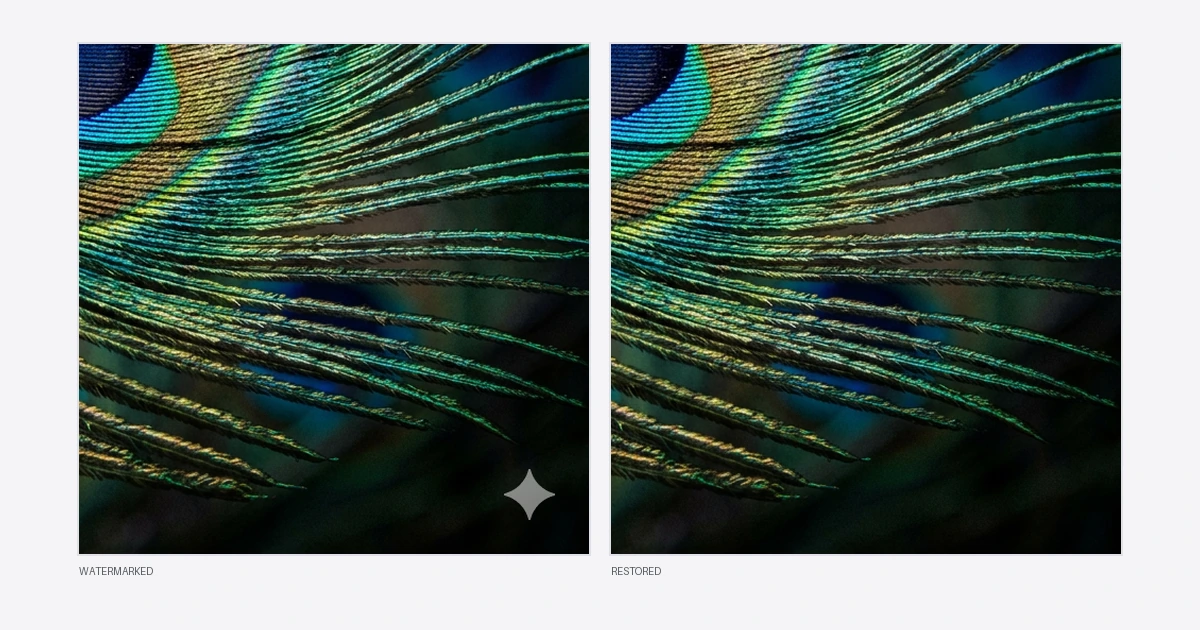
Search for a Gemini watermark remover and every result promises the same thing: lossless, HD, no quality loss. Almost none of them publish a number.
So I measured it. Below is the actual error between a cleaned image and the original it came from, the exact set of pixels that changes, and the one case where "lossless" is the wrong word — including for the tool on this site.
Why exact recovery is even possible
The visible Gemini mark is not burned into the picture. It is a semi-transparent overlay composited onto the finished image, and at its brightest it is only about 51% opaque. Every output pixel in that corner is therefore a blend of two known-ish things:
watermarked = original × (1 − α) + white × α
If you know α for every pixel of that little star — the alpha map — then the original is not a guess. It is one line of algebra:
original = (watermarked − α × white) / (1 − α)
This is the whole difference between two categories of tool. An AI inpainting remover looks at the corner and invents something plausible to cover it. Reverse alpha blending solves for what was already underneath. Only the second one can be lossless, because only the second one is arithmetic.
The watermark is smaller and stranger than most articles claim
A lot of pages will tell you the mark is 96×96 pixels on large images and 48×48 on small ones, with the cutoff around 1024 pixels. That is not quite right, and the difference matters if you are checking a tool's work.
The size follows Gemini's output tier, not the pixel dimensions:
| Output | Mark size | Inset from edge |
|---|---|---|
| 0.5k renders | 48 × 48 px | 32 px |
| Current 3.x 1k | 48 × 48 px | 32 px |
| 2k and 4k | 96 × 96 px | 64 px |
A 1408 × 768 image gets the 48 px mark despite having a long edge well past 1024. There are also variants at 36 × 36, and one at a 192 px inset. If you assume a long-edge rule you will look in the wrong place.
The measurement
The method matters, so here it is in full.
I took the alpha map the engine itself carries, composited it onto a synthetic render at the geometry the engine's own size catalogue specifies, and saved both versions — the watermarked one and the untouched one. Then I ran the watermarked file through the tool in a normal browser, exactly the way a visitor would, and compared the result against the untouched original pixel by pixel.
The detector never knew the picture was synthetic. It only ever saw a real watermark, at real geometry, and had to find and reverse it.
| Test | Max channel error | Pixels changed | Region that changed |
|---|---|---|---|
| 1024 × 1024, 48 px mark | 3 / 255 | 1,999 of 1,048,576 | exactly x 944–991, y 944–991 |
| 2048 × 2048, 96 px mark | 3 / 255 | 8,330 of 4,194,304 | exactly x 1888–1983, y 1888–1983 |
Two things are worth pulling out of that table.
The error is 3 out of 255. That is roughly one percent of one channel, well under what an eye can resolve, and it is not a limitation of the method. It is 8-bit rounding. The original composite was rounded to whole numbers when the image was saved, and reversing it divides by (1 − α), which is about 0.49 at the mark's centre — so a ±1 rounding on the way in comes back out as ±2 or ±3. A tool that reported a perfect zero here would be telling you it had not actually looked.
The changed region is exactly the watermark's own square. Not "mostly". The bounding box of every altered pixel matches the mark's footprint to the pixel, which means every other pixel in the file — 99.8% of the image — comes out byte-identical to what went in. Nothing is resampled, re-compressed, colour shifted or "enhanced". That is the part most quality claims are really about, and it is the part that is easiest to verify.
Where the claim breaks: video
Now the honest half.
The same arithmetic works per frame on video, and the removal step is just as exact. But a video has to be decoded into frames, cleaned, and then packed back into a video file — and that re-encode is lossy regardless of how perfect the removal was. There is no way around it. The frames you got out are not the frames that went in, even in the parts of the picture nobody touched.
Measured on a two-second 720p clip: about 80% of the watermark's excess brightness removed, with the residue reading as a soft diffuse smudge rather than a recognisable star. The file went in at 7.75 MB and came out at 3.08 MB at the default bitrate, which tells you plainly that the whole picture was re-encoded, not just the corner.
So: a cleaned image is mathematically the original. A cleaned video is a re-encode of it. Anyone selling you "lossless video watermark removal" is either using the word loosely or does not know what it means.
There is one more case I could not settle. Some sizes have more than one plausible watermark preset — a 1408 × 768 image has five candidates, including one hand-added 46 px variant that outranks the catalogue's 48 px entry. On a synthetic test at that size the residue was clearly visible. I could not determine whether that is the tool being wrong or my test image being unrepresentative, and I am not going to pretend otherwise. Mainstream sizes were clean; that one is open.
Three "lossless" claims that cannot be true
AI inpainting that is also lossless. These are opposite things. If a model repainted the region, the pixels are invented. They may look convincing. They are not the originals, and at 100% zoom you will usually see the seam.
Removing SynthID. Google embeds SynthID during generation, not as an overlay afterwards. It survives cropping, rotation and recompression by design. Taking off the visible star does nothing to it, and no tool can strip it without visibly wrecking the image. Anything claiming to remove AI provenance is misleading you — including about everything else it says.
Lossless output as JPEG. Even a perfect removal is undone if the result is re-encoded lossily on the way out. If a tool hands you a JPEG, the arithmetic that made the corner exact has just been thrown away everywhere else in the frame. Exports should be PNG.
Check it yourself
You do not have to take any of this on faith, including from me.
Process an image, then open the original and the result in any editor that shows pixel values and difference blending. Set the result layer to Difference over the original. The whole frame should go pure black except a small square in the bottom-right corner. If anything outside that square lights up, the tool touched pixels it had no business touching.
While you are at it, open your browser's developer tools, switch to the Network tab, and process a file. On a tool that genuinely runs locally you will see no request carrying your image. That is a claim you can check in about ten seconds, and it is worth checking, because it is the one claim in this whole category that people most often get wrong about themselves.