Gemini Watermark Remover

Remove the visible Gemini and Nano Banana watermark from AI images without losing quality. Runs 100% in your browser — no upload, no sign-up, no limits.

Runs in your browserLossless, measuredFree, no sign-up
Remove Gemini watermarkRuns in your browser
Select images

Drop Gemini images here

PNG, JPG or WebP — batch supported. Files never leave your device.
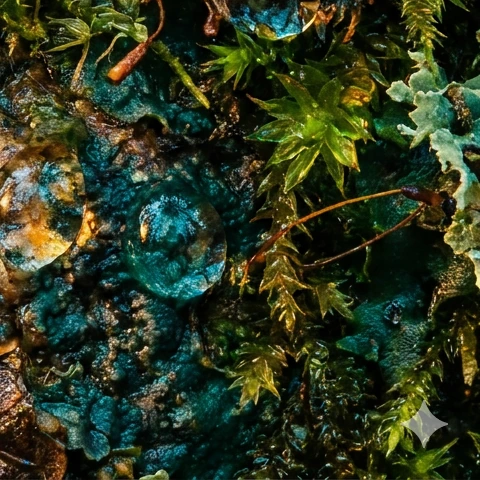
Watermarked — Sparkle in the corner
WatermarkedSparkle in the corner
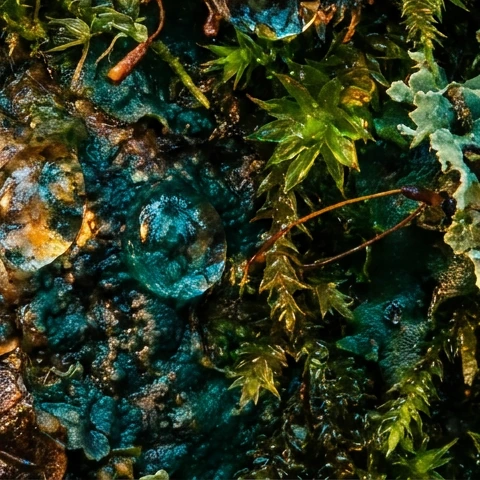
Restored — Texture intact, no smear
RestoredTexture intact, no smear

The pixels come back — not a patch over them

Most removers run a model across the corner and invent something plausible, which is why the result looks smeared at 100% zoom. Reverse alpha blending solves for what was already underneath. Only the watermark's own square changes; every pixel outside it comes out byte-identical to what went in.

Try it on your own image

How this pair was made: the image was generated with Gemini 3 Pro Image (Nano Banana Pro) on a tier that does not add the visible mark, then the engine's own embedded 48×48 alpha map was composited onto it at Gemini's catalogued 32 px inset and reversed with the same arithmetic the tool runs in your browser. The picture, the mark and its geometry are all real.

How to remove a Gemini watermark

Three steps, no account, nothing uploaded. The whole job runs on your own machine.

Step 1

Add your images

Drop or select the Gemini, Nano Banana or Imagen images carrying the sparkle. PNG, JPG and WebP are all accepted, and batches are fine.

Step 2

The watermark is reversed

Reverse alpha blending recovers the exact pixels underneath the mark. This is arithmetic, not AI repainting — nothing is invented or blurred.

Step 3

Download the clean file

Results export as lossless PNG at the original resolution. Everything outside the watermark area is untouched.

Why this removes the watermark without losing quality

Most watermark removers repaint the area with an AI model and leave a soft patch. This one solves for the original pixels instead.

Reverse alpha blending, not inpainting

Google composites the sparkle as a semi-transparent overlay peaking near 51% opacity. Because the alpha map is known, the original pixel is recovered by solving original = (watermarked − α × logo) / (1 − α). Measured on 1024×1024 and 2048×2048 renders, the recovered pixels land within 3/255 of the originals and nothing outside the mark's own square changes at all.

Your files never leave the browser

There is no upload endpoint and no account. Processing happens on your device, which you can confirm in the browser's network tab while the tool runs.

Covers the whole Gemini family

The same four-pointed sparkle appears on Gemini, Nano Banana, Nano Banana Pro, Nano Banana 2 and Imagen outputs. One detector handles all of them.

What the Gemini watermark actually is

Two separate signals travel with every Gemini image, and only one of them can be removed.

01

The visible sparkle

A four-pointed star composited into the bottom-right corner as a semi-transparent overlay, peaking at roughly 51% opacity. Its size follows Gemini's output tier rather than raw pixel dimensions: 48×48 px inset 32 px on 0.5k renders and on current 3.x 1k output, 96×96 px inset 64 px on 2k and 4k. A 1408×768 image therefore gets a small mark even though its long edge is well past 1024. Because it is an overlay with a known alpha map, the pixels beneath it are recovered arithmetically rather than repainted — to within one or two levels out of 255, and only inside the mark's own square.

02

The invisible SynthID signal

A statistical pattern Google DeepMind embeds during generation, not composited afterwards. It survives cropping, rotation and recompression by design, and no tool can strip it without visibly degrading the image. This site does not attempt to, and any tool claiming otherwise is misleading you.

Frequently asked questions

Is this Gemini watermark remover free?
Yes. There is no account, no usage cap and no paid tier. The engine runs on your own CPU, so there are no server costs to pass on.
Are my images uploaded anywhere?
No. Every step runs locally in your browser. Open your browser's network tab while processing an image — you will see no upload request.
Does it remove the Gemini watermark without losing quality?
Yes for the watermark area, which is mathematically restored rather than repainted. Pixels outside that area are never touched, and output is lossless PNG.
Does it work on Nano Banana and Nano Banana Pro?
Yes. Nano Banana, Nano Banana Pro and Nano Banana 2 all apply the same visible sparkle in the bottom-right corner, so the same detection and removal path covers them.
Does every Gemini image have a watermark?
No — it depends on where the image was generated. Google states it keeps the visible sparkle for free and Google AI Pro users, and does not apply it for Google AI Ultra subscribers or in Google AI Studio. The invisible SynthID signal is applied regardless of tier, so a clean-looking image is not an unmarked one.
Can it remove SynthID?
No, and no honest tool can. SynthID is woven into the pixel data during generation, not composited on top, so it cannot be reversed without degrading the image. This tool removes the visible sparkle only.
Can I remove watermarks from several images at once?
Yes. Drop as many files as you like — they process in sequence in your browser and can be downloaded individually or all at once.
Why did it say no watermark was found?
Detection verifies a real Gemini watermark before touching any pixels. Screenshots, cropped copies and recompressed re-saves often no longer match the original overlay, so the file is returned unchanged rather than damaged.
What does the Gemini watermark look like?
A four-pointed star in the bottom-right corner, white and semi-transparent, peaking at roughly 51% opacity. On 0.5k and current 3.x 1k renders it is 48×48 px inset 32 px from the edges; on 2k and 4k output it is 96×96 px inset 64 px. It is composited on top of the finished picture, which is why the pixels underneath can be recovered rather than repainted.
Does Gemini add a watermark to text?
No. The visible sparkle is applied to generated images only — text responses carry no visible mark, so there is nothing for this tool to remove from them. Google does apply SynthID provenance signals across several output types, but that is a separate, invisible signal and no tool removes it.
Why does Gemini Pro still add a watermark?
Because the visible mark tracks the consumer tiers rather than whether you pay. Free and AI Pro output carries it; Ultra, AI Studio and API output generally does not. If you need clean images at generation time rather than afterwards, that tier difference is the lever — see our guide to Gemini images without a watermark.
Why won't the watermark come off my image?
Three common reasons. The image was cropped or resized after generation, so the mark no longer sits at a catalogued position and size. It was re-saved as a JPEG, so the watermarked pixels are no longer the values the reversal expects. Or the mark is not Gemini's — this tool solves for one specific overlay and reports honestly when it finds nothing rather than altering the file anyway.
Can Gemini itself remove a watermark?
Asking a generative model to remove a watermark makes it repaint that region, which invents new pixels and usually leaves a visible smudge at 100% zoom. This tool does the opposite: it solves the blending equation for the pixels that were already there. Measured on 1024×1024 and 2048×2048 renders, the recovered pixels land within 3/255 of the originals.

Ready to remove the Gemini watermark?

Free, browser-local, no sign-up. Drop an image and get a clean PNG back in seconds.

Remove watermark now